
Open New Brand
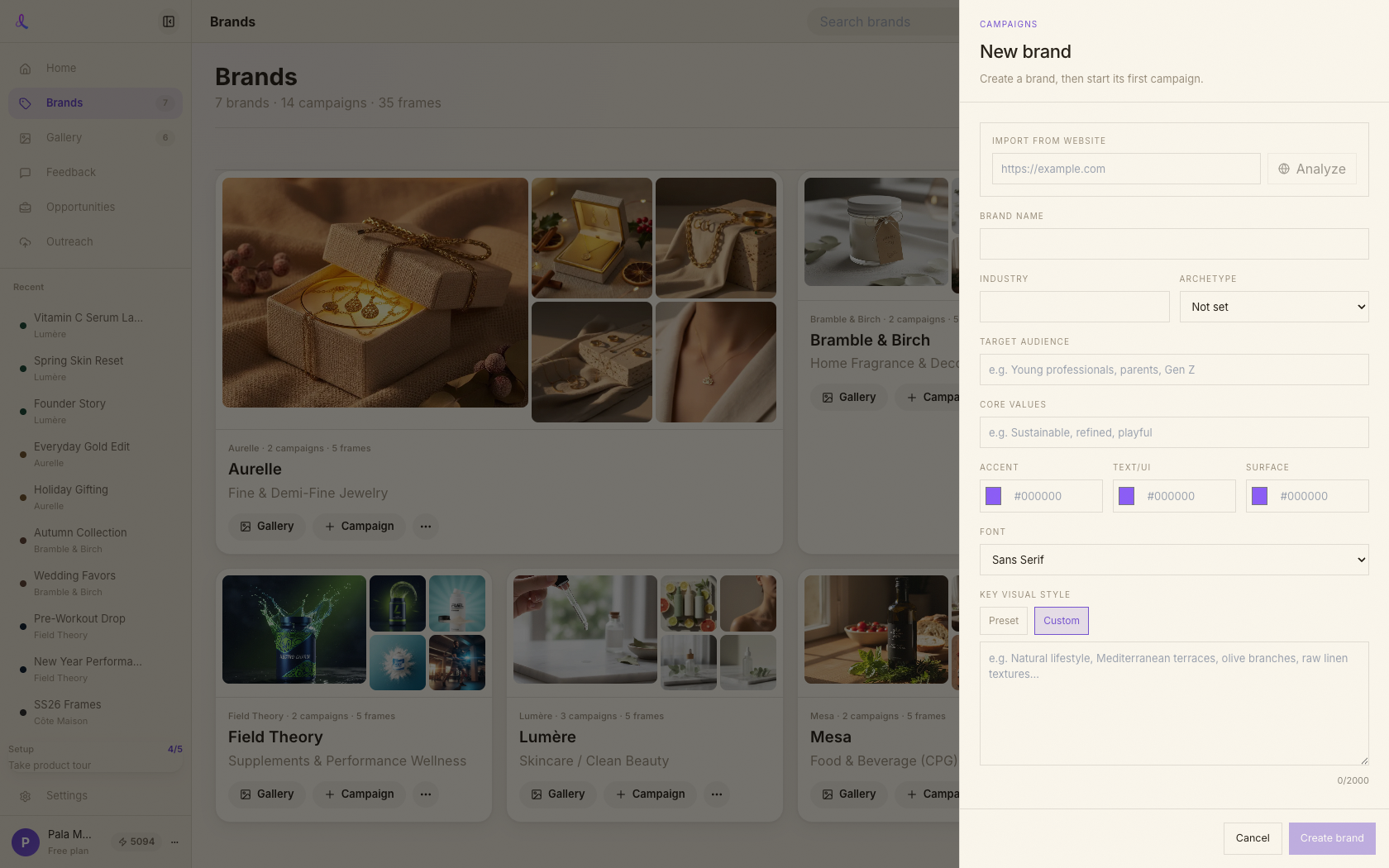
From the Brands area, start a new brand. The brand drawer slides in with an Import-from-website field at the top.
Brands · Website import
Paste your website URL and Dezygn browses the live site to build a ready-to-use brand — colors, fonts, tone, and visual style — that Awa uses on every shot.
How it works
No questionnaires, no swatches to hunt down. Paste your site, watch it read the real pages, then review and save. Prefer to build it yourself? Every field stays hand-editable.
From the Brands area, start a new brand. The brand drawer slides in with an Import-from-website field at the top.
Drop in your site (e.g. https://yourbrand.com) and hit Analyze. Anything public works — homepage, product, and about pages all get read.
Dezygn actually browses the live site — opening the homepage, product pages, and about page. A deep read takes 60–120 seconds; you'll see staged progress while it works.
The form fills with evidence-based values — colors, font, archetype, audience, and a rich visual style. Adjust anything that doesn't feel right; nothing is locked.
Save to store the brand and its fingerprint. No site to import? Skip the URL field and fill the form manually — the brand works exactly the same.
A real read of your live site — not a logo grab — distilled into an editable brand fingerprint.
Skip the setup forms. Paste your site, tweak what you like, and start creating on-brand.