What blueprinting is
Blueprinting is the AI product photography technique where you lock an image in words: you convert it into an exhaustive text-to-image prompt, edit the words, and regenerate. The reason is one line: pixels are hard to edit, words are easy to edit, so convert, edit, regenerate. You ask the AI to describe the image so completely that the description alone could recreate it. Then you delete only the sentences describing the thing you want to replace, keep every other sentence exactly, and regenerate with the new element attached to fill the hole. Reach for it when a scene must be rebuilt around one replaced thing, or when you need word-level control over a layout that only exists as pixels. It is one of two freezing techniques, the other being lock-and-outpaint.
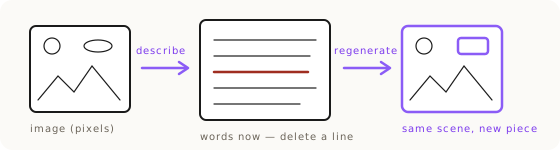
The three moves: draw, edit, regenerate
The whole technique is three moves. First, draw the blueprint: ask the AI to describe the target image so completely that the description alone could recreate it. Every subject, every position, every material, every light source, written down. Second, edit the blueprint: delete the sentences describing the thing you want to replace, and keep every other sentence exactly as it was. You have now cut a hole shaped like the old thing. Third, regenerate with the new element attached, so it fills the hole the deleted sentences left behind.
The reason this works where direct editing fails is that you never argue with the pixels. A compositor asked to swap one element inside a finished scene often refuses, or drifts the whole frame trying. Blueprinting sidesteps that: you are not editing the image at all, you are editing its description, and the description is text you can change one sentence at a time. That is how a client's real mother-of-pearl tiles got into a mahjong scene the model would not edit directly. The scene was described as text, the tile sentences were replaced, and the new tiles filled the hole.
The instruction in practice is literal. On that scene the edit was "leave out any descriptions of the set of tiles," everything else kept, then the real tiles attached as an ingredient. Delete the old thing's sentences, keep the rest verbatim, attach the new thing.
Why the numbered-entity style makes recreations controllable
The blueprint is only as editable as it is precise, and precision here means indexing every duplicate object. When a scene has three chairs and two decanters, the description names them: woman 2, chair 3, decanter 2. That numbered-entity style is what makes a recreation controllable, because each entity can then be surgically edited in the prompt. If you want to change the second decanter and nothing else, you find the decanter 2 sentences and only those, and the rest of the scene holds still.
This is the difference between a description and a blueprint. A loose paragraph ("a lounge with some furniture and drinks") gives you nothing to hold onto when you want to change one object. An indexed description, where every repeated thing has its own number, is a set of handles. You reach for the handle you want, edit it, and leave the others untouched. The more complex the layout, the more the indexing earns its place.
Lock pixels, lock words, or regenerate: choosing the route
Blueprinting is one of two freezing techniques, and choosing between them and plain regeneration is the whole skill. Freezing in pixels is lock-and-outpaint: you keep the product's actual pixels and paint the world around them, which is ideal when the deliverable is a product on a surface at an angle the source already has. Freezing in words is blueprinting: you convert the whole image into an exhaustive text description, edit the words, and regenerate to fill the hole. Both freeze the scene, but in different mediums.
The rule of thumb: if the product is right and only the world needs to change, lock the pixels. If the world is right and one element inside it needs to change, lock the words. Reach for full regeneration only when the product itself has to move, rotate, or be worn, which is a job for pose-matching and chaining, not for a blueprint. The complete decision tree lives in the product accuracy route map.
The trade is real. Lock-and-outpaint never touches the product's pixels, so its accuracy is absolute, but it can only put a frozen product into a new environment. Blueprinting redraws the whole frame from words, so it can rebuild the entire layout around a swapped element, but it accepts a small amount of regeneration risk on everything it redraws. You pick the one whose limitation you can live with for the job in front of you.
Why words are the highest-fidelity input
Blueprinting rests on the Blueprint Principle from the product accuracy pillar: words are the strongest input, and text-to-image is the highest-fidelity path. The photo is a crutch for what we can't describe. It helps, but it takes word-level control away, because you cannot edit pixels the way you can edit a sentence. Before you attach a reference, the question is always "could I just describe this?"
There is a bonus effect people notice the first time they blueprint a low-res source: it naturally upscales. Regenerating from a description escapes the resolution ceiling of the original, because the model is now painting from words, not from a small grid of pixels. This is the course scenario "upscaling an image by recreating it as text." The upscale is a consequence, not the point, but it is a real one: even a low-res product image, if you can write a perfect text-to-image description of it, gives you a higher-resolution output.
The ceiling on all of this is your ability to describe, not the technique. Blueprinting a complex scene means writing every hinge, every material, every light. That is exactly where a good assistant beats a human: it can describe a complex hinge that most people can't.
The blueprint becomes a reusable master
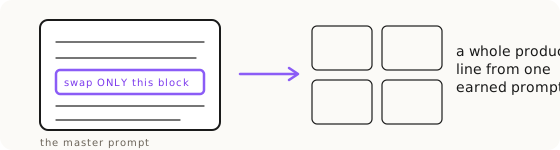
Here is the compounding payoff. A blueprint you built once is not a single-use description, it is a reusable master. One well-built description carries a whole product line through one scene. Once you have a master, new items are surgical swaps of one block only. On the mahjong tiles, the standing instruction was "replace the peacock mentions with whatever new illustration we're working on," leaving the engraving, the frame, the lighting and the camera block untouched. One prompt, 38 tiles.
This is the Tao of the Prompt doctrine in practice: winning prompts are assets. The first approved image's prompt becomes the North Star master for the whole series. You surgically swap only the changed sentences, never rewrite the whole thing, because you don't know which word is doing the heavy lifting. On hard projects, one word out of a thousand can change the whole output, so the safe move is to lock what won and edit around it, not to redraft from scratch and re-roll the dice.
A complete, precise prompt is a lossless representation you can version and edit. Pixels are not. That is the real reason blueprinting compounds: the blueprint is text, so it can be saved, diffed, and reused, while the image it produced is a dead end you can only regenerate from. Treat the description as the asset and the image as its output.
The image is the echo; the prompt is the voice
Underneath blueprinting is a way of seeing the whole job. The image is the echo; the prompt is the voice. Whoever edits only the echo argues with a shadow. When an AI image is wrong, the amateur reaches back into the pixels and tries to paint over the mistake. The craftsman goes to the prompt, because the prompt is where the mistake actually lives. Blueprinting is what makes that possible even when you started with only an image: it converts the echo back into a voice you can edit.
Images can be subject to interpretation. A perfect prompt has no room for interpretation, it is just complete, precise, absolute. That is the point of drawing the blueprint before you change anything: you turn an ambiguous picture into an unambiguous specification, and only then do you make your edit. Change one word and the world changes, so change one word deliberately, on purpose, in the text, rather than gambling on a fresh generation.
The legal angle: text-only proves no infringement
There is a side benefit worth knowing, learned from a fashion-brand prompt engineer's course. Strictly text-to-image work, with no image input at all, proves no infringement, because the text input is evidence that the output was not derived from a protected image. If the entire pipeline is words in and pixels out, there is nothing a protected source could have been copied from.
Blueprinting sits close to this line. When you rebuild a scene from an exhaustive written description rather than editing someone else's image, more of your provenance is text. That is not legal advice, and the moment you attach a reference ingredient you are back to image-in work. But it is a reason the describe-first habit is worth building beyond pure control: the more of your process that lives in words, the cleaner the trail behind the final image.
Key Takeaways.
- Blueprinting locks an image in words: convert it to an exhaustive text prompt, edit the words, regenerate. Pixels are hard to edit, words are easy.
- The three moves are draw the blueprint, edit the blueprint (delete only the sentences for the thing you're replacing, keep the rest exactly), and regenerate to fill the hole.
- Index every duplicate object (woman 2, chair 3, decanter 2) so each entity can be surgically edited in the prompt.
- Lock pixels when only the world changes, lock words (blueprinting) when one element inside the scene changes, regenerate only when the product must move.
- A blueprint is a reusable master: one description carried 38 mahjong tiles through one scene by swapping only the subject block.
- A complete prompt is a lossless representation you can version and edit; the image it produced is not.
Ready to Put This Into Practice?
Dezygn gives you the AI creative tools, training, and community to turn these insights into real results for your clients.
Start FreeRelated Resources.
How to Get Product Accuracy with Nano Banana
Product accuracy in AI product photography is a discipline: name the defect, diagnose it, route it to the right technique, judge the output. Measured, not luck.
Read guideLock-and-Outpaint: Zero Product Drift by Freezing the Pixels
Lock-and-outpaint freezes your product's exact pixels and paints the world around them, so it can never drift. When to use it, the prompt, the failure modes.
Read guideThe Product Accuracy Route Map: Diagnosis to Technique
How do you fix an inaccurate AI product image? Name the defect on one of 8 fidelity axes, then route to the exact technique that clears it. The full map.
Read guide