What a clean reference is
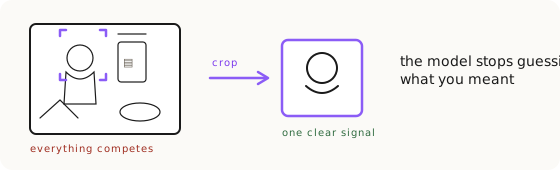
A clean reference is a source image prepared so it communicates only what you want the AI to keep: sharp, evenly lit, on a neutral background, cropped to the product, at a resolution at least as high as the output, and shot at the angle you intend to produce. It is the number one source-preparation technique in AI product photography, because a reference communicates everything it contains, and a busy or weak reference makes the model guess. You use it every time you hand the generator an ingredient instead of pure text. The rule that governs the whole thing is short: if you're not trying to keep it, remove it. A busy reference is noise. Ten seconds of cropping beats an hour of prompting, and no prompt will out-argue the pixels you fed in.
Cleanliness has two stages, and they run in order. The first is at capture, before the product ever leaves the shoot: good light, a clean background, and every angle you might need. The second is downstream prep, the cleanup you do to an existing image before the AI ever sees it. The capture stage is where the cheapest fixes live, so we start there, but most people only ever get to work at stage two, so both matter.
The biggest accuracy lever we have measured
The single largest accuracy gain we have measured came not from a better prompt but from a cleaner input. In a blind-judged pose eval (the drainpipe eval, part of our 2026-07 doctrine campaign), the exact same task went from 0% strict fidelity with a blurry reference to 75% with a sharp one. Round one used packshots with blurry temples, and every route scored 0 out of 12, because the model could never reproduce details the input never showed. Round two swapped in one sharp, upscaled packshot with legible temple text (and tightened the method too: 4K output, three variations per final, a fairness rule for the judge), and a single edit from that reference passed 9 out of 12 blind verdicts. Because round two changed more than the reference alone, we pinned the lever with a controlled pair: the identical prompt run against a deliberately degraded packshot and a sharp one, on a second, unrelated product. From blurry, the output is a plausible pair of sunglasses but not these sunglasses (it invented a hinge). From sharp, the identity holds. Input sharpness was the real bottleneck all along.
There is a phrase that carries this whole page: the AI can't keep details it can't see. It is not a style opinion, it is a measured fact across our eval set. When a temple engraving is a smear in your source, the model does not pause and ask you for a better photo. It invents an engraving, and in more cases than not it invents it wrong. So the corrected house rule is: sharpest possible reference, then one jump, then three variations. Chaining survives only for asks a single edit genuinely cannot do.
Stage one: get it right at capture
There is a huge amount of leverage at the image capture stage, and almost nobody uses it. If you have the physical product in hand, four capture decisions decide how accurate every future AI image of it can be. Light it evenly, with no harsh shadow hiding a detail. Put it on a white or neutral background so nothing competes with it. Get the small details, the text, the hinges, the stitching, sharp and large in the frame. And shoot the angles, not just the hero angle. The test for sharpness is brutally simple: if it's blurry to you, it'll be worse in the output. A detail you can barely read on your own screen is a detail the model will guess at.
This is where the cheapest fixes happen. A minute of care at capture removes an hour of downstream prep and a day of failed prompting, because you never introduce the problem in the first place. The 2K text-legibility rule applies here too: shoot any critical text, logos, and hardware so it lands at least 100 pixels tall in the frame, so it survives into the output. Everything in the next section, the cropping and upscaling and noise-stripping, is recovery work for images that were not captured clean. If you own the shoot, skip the recovery.
Shoot the Angle Bank
The Angle Bank is the capture-time discipline that turns a one-off shoot into permanent accuracy: capture a multi-angle set around the product's full 360-degree axis, at least ten angles, once, in good light on a clean background. A working draft list is front, back, left, right, both front three-quarters, both back three-quarters, top, plus a close-up of every piece of text, every logo, and every bit of hardware. Do it once and, in Bertrand's words, that will ensure future production of AI imagery at high accuracy, forever. Every future shot, in any composition, then has its angle-matched source already waiting. Capture minutes now buy years of production accuracy.
The reason this matters so much is that the highest-accuracy production route, lock-and-outpaint, freezes the exact pixels of the product and paints the world around them, so the product can never drift. But that route demands angle precision: a three-quarter output needs a three-quarter source. The method is only ever as available as your angle coverage. An Angle Bank is what makes it available for every shot instead of the one angle you happened to photograph. For client work, asking for roughly ten angles around the product should be a standard intake request, and the bank itself is a sellable deliverable, not just a means to an end.
Stage two: prep before the AI ever sees it
When you did not shoot the product yourself, you clean the reference before the AI ever sees it, and five moves cover almost every case. Crop to keep: if you're not trying to keep it, remove it, so the model has nothing to reproduce or fight. Upscale to at least 2K on the long edge, with critical text at least 100 pixels tall, and never let the input resolution fall below the output resolution. Strip the noise: remove props, neighbors, hands, and backgrounds until only the product survives. Angle-match: make the reference angle equal the intended output angle. Aspect-match: crop the reference to the output's aspect ratio, so no silent transformation hides inside the frame.
One rule inside noise-stripping is worth its own name, the Polluted Source Rule: never hand the model a reference that contains a competing version of the thing you are adding. If you are compositing a new pair of sunglasses onto a face, a reference that already shows different sunglasses will fight you the whole way. This is the same lesson we hit on person transfer: the exact same prompt that failed with a full-room photo worked dramatically better with a simple face crop. Nothing changed but the crop. When the angle you need does not exist in your sources, do not improvise it in the final scene. Create it in isolation first with pose-match, approve it, and save it into your bank forever.
One clean master per ingredient
Clean Ingredients is the compositing rule that flows out of all this: every ingredient in a shot gets one clean, isolated master, and you only ever composite from the masters. Not two assets, not some fixed number: a shot with a model, a second model, a product, and a background needs four clean masters. The model becomes a clean portrait, plain background, plain shirt, no accessories. The product becomes a clean packshot, isolated on white with all key angles saved (see packshot). The scene becomes an empty stage, approved with nothing in it. Any other element, a logo or a prop, gets isolated on neutral at the correct resolution. The masters are permanent, named, tagged, and reused across every drop.
The reason is the same rule underneath the whole discipline: the source beats the prompt. Anything present in a styled source, old clothing, a stray accessory, a busy background, pollutes the composite, and no wording removes it cleanly. One comp card with a pair of sunglasses tucked in a corner panel cost three hours of failed prompting; one clean portrait with nothing on the face fixed it on the first try. The clean portrait is your prepped ingredient, the comp card is the grocery bag. If you keep consistent characters across a catalog, the clean master is what keeps the face identical from shot to shot.
When you have to synthesize a missing angle
Missing angles can be synthesized, but only with a hard caveat you have to respect. You can ask the model to generate the three-quarter view you never photographed, approve it against reality, and save it into the bank. What you cannot do is trust it blindly, because the AI doesn't know what it doesn't know. Ask it for the back of a product it has never seen, and it does not decline. It invents a back, confidently, and hands it to you as if it were real. Synthesized angles are trustworthy only for geometry the existing sources already imply, and every synthesized angle must be checked against the real product before it enters your bank. The camera outranks the generator for truth, every time.
This is why the whole accuracy hierarchy runs the way it does. If the product is describable, pure text is the highest-fidelity input you have, and the pillar on product accuracy starts there. If it is not fully describable but you photographed it, lock-and-outpaint from the angle-matched source is next. If the angle is missing, synthesize it and approve it with pose-match. And if you have nothing usable at all, you fall back to a stand-in. Clean reference sits under all of it: whichever route you take, the input you feed it decides the ceiling.
Capture tiers by budget
Not everyone shoots the Angle Bank the same way, and the right method depends on budget, so it splits into three tiers. Tier one is the phone protocol: roughly ten angles in good daylight against a clean background, free, and enough for most small businesses and for freelancers instructing a client remotely. Tier two is a controlled setup, a turntable with a fixed camera and consistent light, which gives you evenly spaced, repeatable angles for a studio pipeline. Tier three is a 3D scan: photogrammetry or a scanning device builds a precise 360-degree model, and you render any angle you want as ground truth to feed the AI. A scan completely solves the invented-back problem, because the scan is the back.
One nuance for soft or configurable products, bedsheets, apparel, anything that drapes: they have no fixed geometry, so the bank generalizes from angles of an object to canonical states multiplied by angles. Bedding, for example, means a made bed from the front and sides, a folded stack, and a draped detail, plus texture close-ups. Those close-ups double as the material reference a real fabric needs, the kind of thing that can cross the model's default idea of a material where words alone cannot. For these products the brief asks the client for states, not just angles.
Key Takeaways.
- A clean reference communicates only what you want kept: sharp, isolated, upscaled, angle-matched. If you're not trying to keep it, remove it.
- It is the biggest accuracy lever we have measured: the same task scored 0% strict fidelity with a blurry reference and 75% with a sharp one.
- The AI can't keep details it can't see, and it won't ask for a better photo: it invents the missing detail, usually wrong.
- The cheapest fixes happen at capture: good light, clean background, and shoot the Angle Bank of at least ten angles once, for accuracy forever.
- Every ingredient gets one clean, isolated master, and you only ever composite from the masters, because the source beats the prompt.
- Synthesized angles are trustworthy only for geometry the sources imply, and every one must be approved against the real product before reuse.
Ready to Put This Into Practice?
Dezygn gives you the AI creative tools, training, and community to turn these insights into real results for your clients.
Start FreeRelated Resources.
How to Get Product Accuracy with Nano Banana
Product accuracy in AI product photography is a discipline: name the defect, diagnose it, route it to the right technique, judge the output. Measured, not luck.
Read guidePose-Match: Directing AI Models Without Losing the Product
What pose-match is and when to use it: the route for creating a product reference that doesn't exist yet, plus the eval that says use one jump, not a chain.
Read guideLock-and-Outpaint: Zero Product Drift by Freezing the Pixels
Lock-and-outpaint freezes your product's exact pixels and paints the world around them, so it can never drift. When to use it, the prompt, the failure modes.
Read guide