What control vs variant is
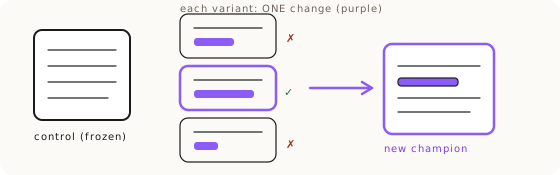
Control vs variant is prompt engineering run as version control. You lock an immutable control base (the composition, layout and camera you already like), then test isolated variants appended one at a time, like feature flags, and score each one against the control: better, worse, or the same. Winners fold into a new champion prompt, and you repeat. You use it when your prompt almost works and you know, or suspect, which one thing is wrong. It exists to kill the failure mode of rewriting the whole prompt every time something is off, because a full rewrite changes ten things at once and you never learn which one mattered. You're not gambling anymore. You're running little experiments, and every image teaches you something you keep. It is a practical way to refine the hero shot without losing the composition, camera, or lighting choices that already work.
Why rewriting the whole prompt fails
When your image is 90% there and you rewrite the entire prompt to chase the last 10%, two things break. The first is token overcrowding: you pile on more words, and the model runs out of attention budget for the parts that were already working. The second is semantic leaking, which is the sneaky one. You only wanted to change a texture, but the layout shifts too, the camera angle drifts, the model that was framed perfectly is now standing somewhere else. You fixed one thing and broke three, and because you changed everything at once, you can't tell which edit caused which regression. That is the slot machine trap wearing a lab coat. Retrying a whole new prompt and hoping is still gambling. The fix is to stop changing more than one variable at a time.
The three layers
The pipeline has three layers, and keeping them separate is the entire discipline. The control base is your spatial geometry: composition, camera, structural layout. You never edit it during an experiment. That is the immutable part, the thing every variant is measured against.
The variants are single, isolated changes appended to the control, one per test. In realism work these are things like lens physics (vignette, chromatic aberration, sensor noise), material precision (slurry lines, tool marks, porosity), or tonal shifts (ISO-800 grain, patina, ambient bounce). One variant equals one appended change, nothing else touched.
The calibration layer is the escape hatch for when variants start diluting your style. If piling on texture words pushes a priority detail out of the model's attention budget, you move that token to the front of the prompt instead of adding more of them. The AI reads the start of the prompt hardest, so front-loading the critical detail is how you protect it. This is the same hierarchy-of-attention logic that runs under the Visual Syntax framework.
The canonical experiment: nine variants, one at a time
Here is what a real run looks like. On a client staircase recreation I started from a locked base prompt (Prompt_Staircase_v1.0) and tested nine realism variants one at a time, scoring each one improvement, no-change, or worse. Vignette improved it. Chromatic edge improved it. Asymmetric exposure improved it. Non-uniform color cast improved it. Production marks improved it the most. Porosity made it worse (it introduced artifacts). Atmospheric dust did nothing (invisible). Tonal range, patina and ambient bounce all improved it, though patina needed damping. Then I consolidated only the winners into a v2.0 champion build.
The finding that came out of that matrix is worth more than the staircase itself: the best gains came from small physical cues stacked together, not from a single heavy stylistic effect. That is why the pipeline works. You can only discover which small cues stack, and which fight each other, if you test them in isolation. A whole-prompt rewrite would have buried that signal completely.
Micro-iterations: when you've narrowed it to one word
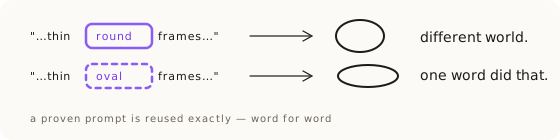
Once you've isolated the failing element down to a single word, you switch to the lightweight sub-move: micro-iterations. When a specific detail won't render, don't retry the same prompt. Vary only the language around the problem area while keeping everything else stable. Run 10 to 15 variations, and 2 to 3 of them will land. Generation is a dice roll, so roll many dice, all of them aimed at the same one word.
The example I keep coming back to is a pair of narrow glasses that kept rendering too tall. Instead of rewriting the prompt, I varied only the shape descriptor: "oval" became "elongated oval," then "narrow oval," "flattened oval," "slim oval," and I added a hard constraint, "CRITICAL: only 4cm vertical height." Everything else in the prompt stayed frozen. A few of those micro-variants held the correct proportions, and those were the keepers. The distinction from the slot machine is precise: retrying the same prompt is the slot machine, micro-iterating is directed search. Same dice, but every roll is aimed at the exact word that's failing. This is the in-session version of control vs variant, and it pairs with the dimension tactics in Product Accuracy with Nano Banana.
The discard pile is the filter
Champion selection is not about the prompt getting more reliable. It is about the discard pile doing its job. One generation is rarely perfect even when the prompt is right, because the same prompt with different dice produces some keepers and a lot of misses. So you generate, you judge each image against the real product, and you keep only the flawless ones. A 90% discard rate is not a failure of the prompt. It is the visual filter working exactly as intended. On one eyewear drop the real count was 137 generated, 27 shortlisted, 12 delivered. Budget two to three hours for a hard shot, and show the client only the ones with no defect. The discard pile is the price of accuracy, not evidence you did something wrong.
Draft cheap, finish expensive
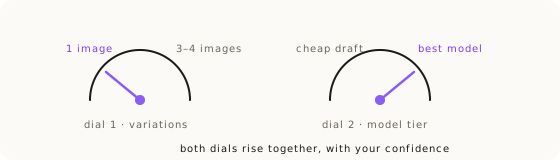
Once you accept that you'll generate many and keep few, the question becomes how many, and on which model. There are two dials, and they both turn on one axis: how sure are you of the direction? Turn them up only as confidence rises.
Dial one is variation count. While you're exploring (testing an idea, a composition, a direction) you generate one image at a time. Extra copies of an unproven idea are pure waste. Once the direction is locked and you're choosing the final, you run variations of the winning prompt and pick the best of the litter. Scale the count to difficulty: 3 to 6 variations for an easy shot with a known recipe, up to 10 for a hard product with fine details. If you find yourself needing more than about 10 on the same prompt, the prompt is the problem, not the dice, and it's time to switch technique via the product accuracy route map.
We measured this. On a drainpipe fidelity eval, best-of-3 culling lifted strict fidelity from 75% per image to 100% per chain: generate 3, keep 1, and the chain passes every time. Generate-three-keep-one is a legitimate quality lever, and when the delta is small it is a cheaper quality lever than bolting extra steps onto your pipeline. Cull before you add steps when the delta is small, which is the same lesson the sequential pipeline lands on from the other side.
Dial two is model tier. Draft on a cheap, fast model where resolution doesn't matter, because while you're deciding what to make, an image that costs a fraction of a cent is enough. Then switch to the premium model for the final render, higher resolution for intricate-detail products like jewelry and glasses. The economics are simple: premium runs about $0.15 an image against roughly $0.02 for a budget draft, so you spend the expensive credits only on directions you've already validated. Never one-shot at full price. Never ship at draft quality. Model names change every six months. The principle doesn't.
Knowing when to stop climbing
Control vs variant is a ladder, and the discipline includes knowing when you've reached the top of the wrong ladder. The pipeline is the right tool when your prompt almost works and you can name, or at least suspect, the one thing that's off. It is the wrong tool when the whole direction is broken, or when no single edit can bridge the gap (a rotation the reference never showed, a product that has to be re-posed before it can be placed). Those are routing decisions, not iteration decisions. It is also the wrong tool when you cannot name the failing element at all: that is where you stop iterating and run a Shannon Descent, isolating the smallest piece that still fails and solving it alone before rebuilding around it. When variations plateau completely and the same isolated changes stop moving the needle, the model itself may be the variable: same prompt, next model. And when you've narrowed to one failing word and 15 micro-variants still won't hold it, that word is telling you the input, not the prompt, is the bottleneck. Iterate inside a route; switch routes when iteration stops paying.
Key Takeaways.
- Control vs variant is prompt-as-version-control: lock a control base, test one isolated change per variant, keep the winners, repeat.
- Rewriting the whole prompt causes token overcrowding and semantic leaking, so you fix one thing and break three with no way to tell why.
- The best gains come from small physical cues stacked together, not one heavy effect, and you can only find them by testing in isolation.
- Micro-iterations are the one-word version: vary only the failing descriptor 10 to 15 times, keep the 2 to 3 that land.
- A 90% discard rate is the visual filter working, not a broken prompt: 137 generated, 27 shortlisted, 12 delivered on one real drop.
- Draft cheap, finish expensive: one image on a cheap model while exploring, 3 to 6 (up to 10) on the premium model once the direction is locked.
Ready to Put This Into Practice?
Dezygn gives you the AI creative tools, training, and community to turn these insights into real results for your clients.
Start FreeRelated Resources.
How to Get Product Accuracy with Nano Banana
Product accuracy in AI product photography is a discipline: name the defect, diagnose it, route it to the right technique, judge the output. Measured, not luck.
Read guideThe Sequential Pipeline: Build Complex AI Product Shots in Checked Steps
Chain for control: decompose a complex AI product shot into validated intermediate assets with a hard quality gate between every step.
Read guideThe Product Accuracy Route Map: Diagnosis to Technique
How do you fix an inaccurate AI product image? Name the defect on one of 8 fidelity axes, then route to the exact technique that clears it. The full map.
Read guide