
Shot Type
Comparison Sells — If Both Frames Are Honest
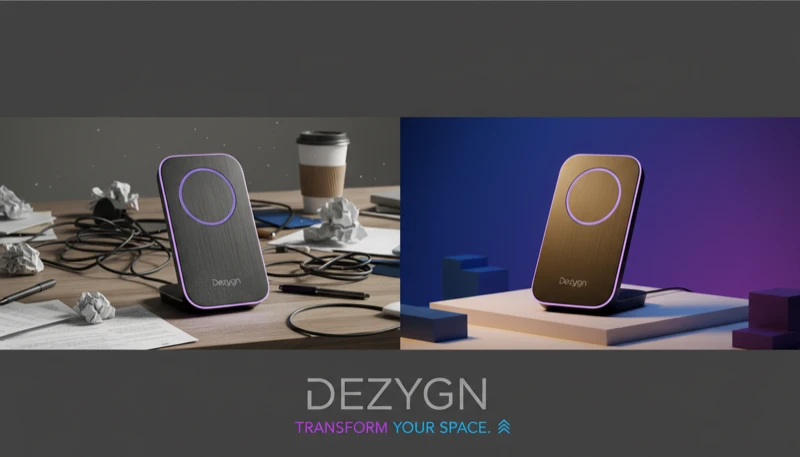
Before/after and comparison shots show contrast: the problem state and the solved state, the messy desk and the organized one, the dull surface and the polished one. They're among the highest-converting formats in e-commerce because they sell the outcome, not the object. They're also where trust goes to die when done dishonestly. The rule from running real client work: the AI image must respect physical reality. 'Close enough' isn't a style choice — close enough is a refund, and refunds kill businesses. Use this format to dramatize a real difference, never to manufacture one.
When to Use This Shot Type.
Cleaning, organization, restoration and tool products, where the transformation is the entire pitch
Ad creative — the split-frame format is a proven scroll-stopper on Meta
Landing pages demonstrating use: with/without, day/night, packed/unpacked, assembled/unassembled
Comparison content that contrasts contexts (product in drawer chaos vs. in its organizer) rather than claiming physical results
How Dezygn Creates These.
The craft of a before/after is sameness. The two frames must match in everything except the change: same scene, same camera position, same focal length, same light. Any drift between frames reads as manipulation — because it is. In Dezygn you build the scene once as a standalone asset, lock the camera recipe, and generate both states inside that fixed container. Sequential construction is what makes the discipline possible; one-shotting two matching frames is a coin flip.
Visual Syntax-wise: Scene and Camera are frozen across both frames. Subject changes state. Style stays documentary-clean — bright, even, f/8 sharpness — because stylized drama undermines the 'this is evidence' read that makes the format convert.
Where the line is: staging contexts is legitimate (the cluttered counter, the tidy shelf). Fabricating product performance is not — especially body-results claims in skincare and supplements, which platform policies restrict and which violate the accuracy principle this whole system is built on. Show the product's real difference dramatically; don't invent a difference.
Pro Tips.
01
Lock everything except the change
Generate the scene as a reusable asset and produce both frames from it with identical camera language. If the camera moves or the light shifts between frames, viewers sense the trick even when they can't name it.
02
Let the 'before' be genuinely ugly
The instinct to art-direct the before frame kills the format. The before should be believably bad — dim, cluttered, unflattering — and the after should win on the merits of the same honest camera.
03
Use it for context, not claims
The safe, durable version of this format contrasts situations: without the organizer vs. with it, before the candle is lit vs. the lit ambiance. Physical-results claims (skin, hair, body) are a policy and trust minefield — sell those products with texture, ritual and lifestyle instead.
04
Label the frames
A small 'before / after' label improves comprehension at feed speed and signals confidence. If the comparison needs studying to be noticed, the shot failed — contrast should land in half a second.
Create Before & After Photography with AI.
Generate professional before & after photography in minutes, not hours. Dezygn's AI understands composition, lighting, and brand consistency.
Start FreeRelated Shot Types.
Packshot Photography
The packshot is your product, isolated on a clean background, lit evenly, with nothing else in frame. It's the shot Amazon requires, every marketplace expects, and every product page is built on. It is also where AI photography most often falls apart — because the packshot is a pure accuracy test. There is no scene to hide behind. If the cap is the wrong material, if the label text is mangled, if the proportions are off, the customer sees it instantly. Accuracy is non-negotiable here: an embellished packshot doesn't just look bad, it generates 'item not as pictured' refunds.
Learn moreLifestyle Photography
A lifestyle shot places the product in a real-world context — a kitchen counter, a gym bag, a café table — and answers the question every shopper silently asks: 'what does this look like in my life?' It's the workhorse of ads and social because context creates desire in a way isolation can't. It's also the shot where amateurs one-shot everything ('woman in kitchen holding product, professional, beautiful') and get compromises on every element, because the AI has to solve for person, product, pose, environment and lighting simultaneously.
Learn moreDetail Close-Up Photography
The detail close-up fills the frame with one square inch of the product: the hinge, the stitching, the milling, the weave. Its job is proof. Anyone can claim 'premium materials' in copy; the macro shot is where the claim gets checked. For premium products this is the conversion shot — customers paying $300 for titanium frames or $200 for a leather bag want to inspect the thing they can't touch. It's also the shot that punishes lazy sourcing hardest, because at macro distance every hallucinated detail is visible.
Learn more