What a count error is
A count error is when an AI image gets the number of parts wrong: five buttons instead of four, two straps instead of one, an extra lace hole, a missing pocket, six chairs where the set has four. It is one of the eight accuracy axes we score every product image on (outline, proportions, count of parts, text, artwork, material, color, and small construction details), and it belongs to a defect class that almost nobody names, because a count error hides. The scene looks gorgeous, the material reads right, the lighting is perfect, and the product simply has one part too many. You use this check on anything with a countable feature, and you run it before the image ever reaches a client, because a wrong count is an 'item not as pictured' refund waiting to happen.
Why models produce count errors
The one law under every accuracy defect is the same: never ask the AI to make a big jump in one step. A jump is the distance between what your inputs already show and what you are asking for. Big jumps fail in random ways, and count is one of the places that randomness shows up. The model was trained on images, not on inventories. It renders a plausible-looking cluster of buttons, not a counted set of exactly four, so when the delta is large the count is left to the dice.
Count drifts hardest when the product is being rotated or re-posed. Most of the errors in accuracy come when we try to rotate the product or show a size the AI is not aware of. Every degree off the source angle is something the AI has to invent, and when it invents the hidden side of a shoe or the back of a bag, it invents the number of eyelets or straps too, and it invents them wrong. This is why count errors cluster on the exact shots that need a transformation, and why the fix is almost always to shrink the transformation, not to describe the count louder.
It also means a count error is rarely a prompt-wording problem you can win by adding the word 'four.' The model does not count. Writing 'exactly four buttons' helps at the margin, the same way 'extremely small' helps with size, but it is a nudge on a probability, not a guarantee. Treat count like every other accuracy axis: diagnose it, then pick a technique that removes the guess, rather than asking the same prompt to roll better.
How to spot count errors systematically
You do not catch count errors by looking at the image and feeling good about it. You catch them with a fixed rubric. The 8-axis fidelity check is that rubric: silhouette, proportions, element count, text, graphics, material, color, and construction details, each scored match, off, or not-visible against the reference. Element count is its own axis on purpose, so it cannot get lost inside a general 'looks right.' The axes are fixed; the per-product features (how many buttons, how many straps) are extracted from the real product photos.
This is not just a mental checklist. It runs in production as a fidelity judge, a port of our T7 fidelity bench, so the count axis gets scored on every generation instead of only when a human remembers to look. But the judge raises the floor, it does not replace the eye: you do need a good eye for details, and the count axis is exactly the kind of quiet defect a tired human skims past and a fixed axis does not.
The 4-star gate and the side-by-side diff
Nothing ships until it clears the gate. Score the image on the 6-Ingredient Scorecard (Style, Subject, Action, Scene, Camera, Brand) from 1 to 5, and ship only at 4 or above on every one. A gorgeous scene around a wrong product scores 2 on subject, and it does not ship, no matter how good the rest looks. A count error is precisely the defect that drops the subject score while everything else stays high, which is why the gate is per-axis and not an average.
Two checks find the count error in practice. First, the side-by-side diff: put your original product photo and the generated image next to each other, zoom in, and look for any difference in the shape, the details, the colors, the material, the text. Anything on the product that does not match the real thing is a problem, no matter how pretty the scene around it looks. Reading a variant against a control this way is a diff checker for pixels: you are not admiring the image, you are counting against a reference.
Second, let a vision model do the counting for you. Upload the generated image plus the original packshot to an LLM and ask: 'Does the product match the proportions and dimensions of the original? Any accuracy issues?' A second reader that counts parts against the reference catches the extra button you have looked at forty times and stopped seeing. Use both, because the machine reader and the human eye miss different things.
The fixes: diagnose first, then pick one route
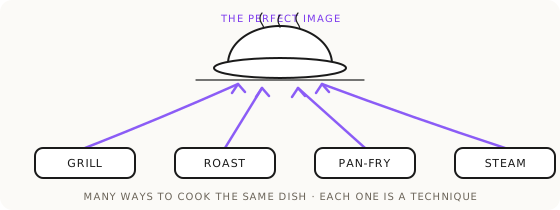
Once you know a shot has a count error, do not technique-hop at random. Diagnose that it is a count problem, then commit to one route, and switch methods only when a route keeps failing, never by forcing the same one harder. Three routes handle most count errors.
When you know which part is wrong, run control vs variant with a burst of micro-iterations on that one element. Lock a control image, change exactly the failing thing and nothing else, keep the winner, fold it in, repeat. Micro-iterations are the tight version of this: do not retry the same prompt, vary only the language around the problem area while everything else stays stable. Generation is a dice roll, so roll many dice, all aimed at the same one word. Run 10 to 15 variations and 2 or 3 will land the count.
When the count keeps drifting under a rotation, stop making the compositor carry the rotation. Transform the ingredient first, in isolation: re-pose the product on its own, check the count on that clean output, then use the approved angle as the reference for the next step. This is the drainpipe, one small delta at a time, and it removes the exact conditions that cause count drift. Save the approved angle forever, so the next shot of that product starts from a reference that already has the right number of parts.
When the part can be described in words, describe it. Blueprinting turns the image into a complete text prompt, so you can state 'exactly four eyelets' or 'a single strap' as an explicit constraint and regenerate. Text is your highest-fidelity input for anything you can actually spell out, and a countable feature is one of the easiest things to spell out precisely.
The zero-drift route: lock and outpaint
The most reliable way to fix a count error is to make it impossible. If the product can stay in one place, freeze its exact pixels and generate only the world around them with lock-and-outpaint. The skeleton, verbatim: 'Keep the [product] [image1] in exact original position, crop, zoom, and angle. Do not regenerate, alter, or reprocess the product itself. Outpaint the background on all sides into [surface/environment]. Match the existing lighting on the product to the new light direction.'
Because the product is never redrawn, its count cannot change. Zero product delta means zero product drift, and count is a form of drift. When the deliverable is a product on a surface, this is the highest-accuracy route you have, and it takes the count axis off the table entirely: the four buttons in the source are the four buttons in the output, every time. Reach for this before you try to describe a count louder in a full regeneration.
Plan the discards, and know when to finish by hand
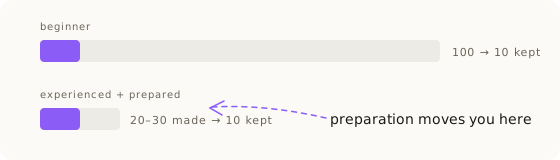
Accuracy work is probabilistic, and count is part of what you are filtering for. One generation is rarely perfect even with the right prompt, so plan for it: 3 to 6 variations on an easy task, up to about 10 on a borderline one. Beyond roughly 10 on the same prompt, the prompt is the problem, not the dice. A high discard rate is not a failure, it is the visual filter working. A prepared operator keeps 1 in 2 or 3; a beginner keeps 1 in 10. On one hard eyewear drop the real count was 137 generated, 27 shortlisted, 12 delivered, and the client only ever saw the flawless ones.
Sometimes a count will not converge no matter which route you run. Before you call that a wall, run a Shannon Descent: drop the scene, generate the countable part on its own until the number holds, then rebuild around it. The sign of a real wall is that two full routes are exhausted, the same defect keeps returning, and new tries break other parts. Then the AI builds 90% and the last 10% of truth gets applied by hand from the real photo, in an editor. That is a proposal with evidence (here are the attempts, here is the count that will not hold, here is the manual fix), never a silent giving-up. The pillar guide, product accuracy with Nano Banana, covers the full route map this sits inside.
Key Takeaways.
- A count error is a wrong number of parts (buttons, straps, holes, products) and is one of the eight accuracy axes every image is scored on.
- Models produce count errors because they render plausible clusters, not counted sets; the error is worst when the product is rotated or re-posed.
- Catch count errors systematically: score the element-count axis, diff generated against packshot side by side, and let a vision LLM count parts for you.
- Nothing ships below 4 of 5 on the subject axis; a gorgeous scene around a wrong-count product still fails the gate.
- The zero-drift fix is to lock the product pixels and outpaint the world: if the product is never redrawn, its count cannot change.
- When two routes are exhausted and the count will not hold, finish the last 10% by hand from the real photo, with evidence, not silently.
Ready to Put This Into Practice?
Dezygn gives you the AI creative tools, training, and community to turn these insights into real results for your clients.
Start FreeRelated Resources.
How to Get Product Accuracy with Nano Banana
Product accuracy in AI product photography is a discipline: name the defect, diagnose it, route it to the right technique, judge the output. Measured, not luck.
Read guideControl vs Variant: The Scientific Method for AI Product Images
How to fix an almost-working AI image without breaking it: lock a control, test one change per variant, and keep only the winners. Prompt-as-version-control.
Read guideThe Product Accuracy Route Map: Diagnosis to Technique
How do you fix an inaccurate AI product image? Name the defect on one of 8 fidelity axes, then route to the exact technique that clears it. The full map.
Read guide