What material fidelity is
Material fidelity is the skill of translating what a client means into words an image model has seen a million times, so the finish it renders matches the real product. The model knows the world through training photos, so the same material lands or misses depending on which words you pick. Before you write a single texture word, though, you have to know one thing: the material prior. A material prior is what the model already believes a material looks like by default, before you describe anything. Say "white percale sheets" and the model has one fixed idea of that (smooth, hotel-flat), no matter what you add. So the first move in material fidelity is not writing better adjectives. It is running the prior test: finding out what the model already believes, then deciding whether words can move it at all.
The prior test: ask what the model already believes
The prior test is a single question you ask before generating: what does the model think this material looks like by default? You answer it empirically, not by guessing. Generate the material with its plain real name and nothing else ("white percale bedsheet", "pebbled leather tote"), look at what comes back, and you have just read the prior straight off the screen. That default output is your starting line. Everything you do next depends on whether the default is right, wrong, or split. Skip this step and you can burn an hour stacking texture adjectives onto a material whose prior no wording will ever cross, which is the most common way material work quietly fails.
The reason the test matters is that words behave completely differently depending on the prior. On some materials the plain name is already perfect and extra words add nothing. On others, no words on earth will fix it, and piling more on makes it slightly worse. On a third kind, words are the whole game. You cannot tell which case you are in from the material alone. You find out by looking at the default, then you pick your route.
Three prior classes (we measured this across 75 images)
We ran a controlled eval to settle this: five materials, five prompt arms each (plain name, magnitude adjectives, analogy, forbid-by-name, and all combined), three repeats, 75 images, judged blind by a model that never saw which arm or target it was scoring. The materials sorted cleanly into three prior classes, and the class is what decides whether your words do anything.
Correct prior: the model already pictures it right. Linen duvet, tweed blazer, waffle towel all scored 4.2 to 4.7 on the plain real name alone, and every extra arm of wording added essentially nothing. Here the name is the whole job. Say "linen", stop, spend your prompt budget elsewhere.
Wrong prior: the model pictures it wrong and words cannot cross it. White percale is the hard case. It scored 2.1 to 2.7 in every single arm, and the plain name (2.67) was actually the best of them. Magnitude adjectives, analogies, forbid-by-name, all of it combined: piling on words trended slightly worse, not better. As I put it after reading the results, the model's idea of "white hotel bed" is smooth, full stop. No description reaches across that.
Ambiguous prior: the material has more than one common look, and this is the only class where words genuinely pay. A leather tote can be smooth or pebbled, and the model does not know which you mean. Plain name scored 3.22; adding magnitude adjectives ("heavily pebbled", "deeply grained") pulled it up to 4.11, a real gain of about +0.9. Texture adjectives earn their keep exactly when the material has more than one common look. That is the sentence to remember: adjectives are for ambiguity, not for correction.
Speak the model's language: material analogies
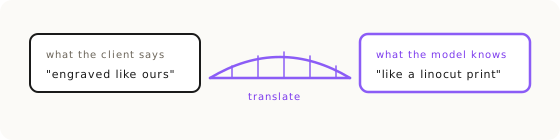
When a material sits in the correct or ambiguous class, the highest-leverage move is a material analogy: describe the finish as a famous craft or process the model has seen thousands of times, not with the client's in-house term. "Engraved the way the client wants" is not a training concept. Linocut, woodblock, and lacquered woodcarving are. On the Mise en Mahjong tiles, the engraving into mother-of-pearl only cracked once I described it as a known craft, verbatim: "carved as recessed grooves filled with thick matte black hand-painted enamel, fine fibrous woodgrain stamp pattern resembling a linocut print pressed into the pearl surface." The client's word for the effect was useless to the model. The craft it resembles was the key. This is the same principle as naming a real film stock instead of "vintage look", or a real camera and lens instead of "professional photo": a real name the model has indexed beats an adjective it has to interpret. There is more on the full accuracy method in Product Accuracy with Nano Banana.
Forbid by name: close the doors one at a time
Every named exclusion closes a door the model would otherwise wander through. Forbid-by-name is writing a negative list that fences out the specific failure modes for that material, calling each one out by its actual name. On a percale bedding job, where the whole job was fighting the smoothing prior, the negative block ran: "no sheen, no shine, no satin/sateen gloss. Smooth flat weave, not slubby, not textured like linen." Notice what that does. It does not just say "matte"; it names sheen, satin, and sateen as things to avoid, and it names linen as the wrong neighbor so the model does not drift toward it. The eval showed forbid-by-name will not rescue a wrong prior on its own (percale stayed at 2.1 to 2.7), but on correct and ambiguous priors it is a clean way to steer away from the specific near-miss the material keeps producing. Name the failure, don't just describe the target.
Build the client glossary first
Before you generate anything, collect the client's own technical vocabulary. The client glossary is the set of exact terms that distinguish this product from something merely like it, and building it first is what separates a real deliverable from a plausible fake. For a premium bedding client I built a full English and French bedding glossary before touching the tool: flange is volant, quilt cover is housse de couette, waffle is nid d'abeille. Those phrases are gold for your system messages and negative prompts. The pattern repeats on every domain client: on a pipe-support hardware client it was struts, clamps, and load path. You cannot forbid "slubby" or ask for a "structured drape" if you do not yet have the words, and the words live in the client's world, not yours. Harvest them up front, and half the material battle is won before the first generation. For getting the client's own terms into the workflow, the Visual Syntax framework is where the brand block gets defined once and reused.
Hunt the one wrong word
When the output is almost right, do not rewrite the prompt. Hunt the single wrong word instead. Materials described by process are unforgiving about vocabulary: engrave, emboss, embed, and intaglio each pull a different geometry out of the model, and swapping one for another can be the whole fix. On the mahjong tiles I caught this live and asked it plainly: "I want this to be an engraving but it's looking more embossed than anything. What word am I using wrong in the prompt?" That is the diagnostic. Once you find the near-twin that is wrong, do not rewrite around it; burst it with micro-iterations, generating slight variations of that one descriptor (engrave, then intaglio, then recessed carving) until one clears. This is the same odds-forcing move covered in size control for dimensions: isolate the failing word, vary only it, keep the winner.
Steal proven wording
A phrase that worked once is an asset. Reuse it whole. The reason is simple and slightly humbling: you don't know which word was load-bearing. When a material description finally renders correctly, some specific word or clause in it did the heavy lifting, and you usually cannot tell which. Rewrite it "cleaner" for the next product and you may quietly delete the exact token that made it work. So when a phrasing is proven, steal it verbatim into the next prompt and swap only the subject, not the material language around it. This is the material-fidelity face of a broader prompt doctrine: a winning prompt is a first-class asset you edit surgically, never a draft you rewrite from scratch. Treat the material clause the way you would treat a working recipe, because that is what it is.
When words can't cross the prior: change route, don't fight
If the prior test tells you the material is in the wrong-prior class, stop writing words. The rational move is to change route, and doing so is a professional decision, not a workaround. There are two escapes. First, show instead of say: attach a texture reference, a factory close-up of the actual material, and let the pixels carry what words cannot. That only pays if it is a clean reference, sharp and cropped tight on the weave, because a soft close-up carries noise instead of texture. Second, plan the manual handoff up front: get the model to bring the scene 90% of the way, then apply the last 10% of material truth by hand from the factory reference. On that same percale job, after 45 minutes of prompting failed to hold a crisp drape, the fix was an Affinity clone-brush transplant of the real folds from the factory image onto the AI lifestyle shot. That was the rational route, not a defeat. The skill is reading the prior early, recognizing the wall, and picking the route that clears it, instead of burning credits into a prior no prompt will ever move. Which route fits which gap is the whole subject of the product accuracy route map.
Key Takeaways.
- A material prior is what the model already believes a material looks like by default; check it before writing any texture words.
- Run the prior test: generate the plain real name alone, read the default off the screen, then decide if words can move it.
- Materials fall into three prior classes: correct (name is enough), wrong (no words cross it), and ambiguous (adjectives finally pay).
- We measured this across 75 images: white percale scored 2.1 to 2.7 in every arm, while adjectives lifted ambiguous leather by about +0.9.
- Material analogies beat adjectives: name a known craft (linocut, woodblock) or a real film stock, not the client's in-house term.
- When words can't cross the prior, change route: attach a texture reference or plan the manual handoff. That is the rational move, not a workaround.
Ready to Put This Into Practice?
Dezygn gives you the AI creative tools, training, and community to turn these insights into real results for your clients.
Start FreeRelated Resources.
How to Get Product Accuracy with Nano Banana
Product accuracy in AI product photography is a discipline: name the defect, diagnose it, route it to the right technique, judge the output. Measured, not luck.
Read guideSize Control: Why AI Doesn't Understand Centimeters
Write '5cm border' and get one four times bigger? AI learned from pictures, which carry no measurements. Steer size with magnitude words and clean anchors.
Read guideThe Product Accuracy Route Map: Diagnosis to Technique
How do you fix an inaccurate AI product image? Name the defect on one of 8 fidelity axes, then route to the exact technique that clears it. The full map.
Read guide