What Size Control Is
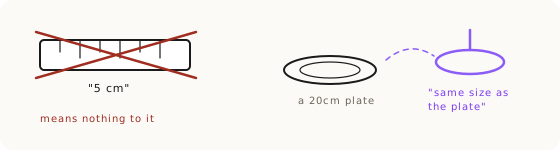
Size control (we call it dimension control) is the technique for making an AI image render a product at the size you actually want, instead of the size the model assumes it should be. It exists because of one law: the AI learned from pictures, and pictures carry no measurements. The model knows relative magnitude, never centimeters. Write 'a 5cm border' and you might get one four times bigger. The fix is not a better number. It is to steer size with words the model can feel (small, very small, extremely small), to anchor the object to things the model knows cold, and to put that instruction first in the prompt. You use size control any time the product's size is unusual, load-bearing, or the whole point of the shot.
Why Centimeters Don't Work
The model draws the default size, and the number is decoration. We measured this across 126 images: an arm that gave the AI only centimeters (cm-only) scored dead last, 0.196 mean size error. It only looked accurate when the requested size happened to match the object's typical size. Ask for something unusual and the number is ignored completely. A 5cm spice jar rendered at 94% of a mug's height instead of the 53% it should have been. That is the trap: centimeters give you fake accuracy. When the default already matches your ask, the number looks like it worked. When it doesn't, the number does nothing.
This is why we say centimeters don't steer, they coast. Keep writing the number anyway, because it is the truth for humans reading the brief, but do not expect it to move the image. Steering is a different job, and it needs a different tool.
The Magnitude Ladder
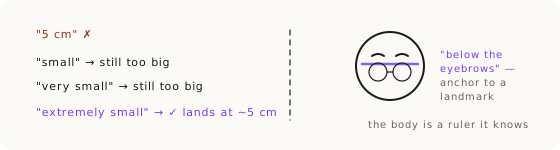
The magnitude ladder is the first real steering tool: escalate the size word until reality matches. Start with 'small.' If the render comes back too big, go to 'very small.' Still too big, 'extremely small.' Climb the rung until the image lands. Keep both the number and the winning word in your prompt: the number is truth for the humans, the word is steering for the AI. Climbing the ladder is micro-iterations aimed at size: change only the size word, leave the rest of the prompt frozen, and keep the rung that lands.
There is a catch we found in the eval, and it changes how you use this. Magnitude words are a hammer, not a dial. 'Extremely small' nails extreme targets (3% off in our tests) but overshoots moderate ones. Asked for a bud vase at 40% of a reference height, the magnitude arm rendered it at 17%. A 'notably tall' lip balm came out 2.0 to 2.2 times its base instead of 1.55. So the ladder is not a precision instrument. It is a rescue tool for sizes that are far from normal, and it wrecks sizes that are already close to normal.
Anchor to One Clean Thing (Not Hands)
Comparisons calibrate, but only with clean anchors. The idea is to chain your product to an object the model draws consistently: 'a dinner plate about 20cm across sits on the table; the lamp is the same width as the plate.' Or tighter: 'the bottle is 1.5 times the height of the cork beside it.' In the eval that cork phrasing came in 2% off. But the original doctrine listed hands, plates, and faces as anchors the model 'knows cold,' and the measured data killed that assumption.
A hand was one of the worst anchors we tested: 39% error. A plural anchor (a row of books) failed too, at 30%. And a comparison with no landmark phrase missed by 25%. The lesson: drop hands and drop plural objects from your anchor list. What works is one clean, singular anchor plus a landmark phrase. 'Rim level with the seat' came in 7 to 9% off. 'No taller than the books beside it' fails; '1.5 times the cork' wins. Anchor to a single, unambiguous object the model renders the same way every time, and tell it exactly where the edges line up.
Landmark Anchoring, Shout-and-Forbid, and Sketch It
Landmark anchoring uses the body or the product's own parts as a built-in ruler. For sunglasses that keep floating up the face: 'sits low on the face, bottom of lens just reaching mid-nose; top rim clearly below the eyebrows, visible strip of skin between brow and frame.' You are not naming a measurement, you are naming where the object's edges fall against fixed landmarks. This is the same reference-wins logic behind material fidelity: show the model a relationship it can verify against the pixels, not an abstract figure it has to imagine.
Two more tools finish the kit. Shout-and-forbid uses capitals and names the blocked mistake outright: 'CRITICAL: only 4cm tall, NOT tall aviator-style frames.' Naming the specific wrong outcome is often more effective than describing the right one. And when a position simply will not go into words, sketch it. Even a rough sketch speaks the model's native visual language. On one eyewear job, adding a crude eyebrow sketch doubled the hit rate. If you can draw it faster than you can describe it, draw it.
The Measured Decision Rule
Here is the part nobody else publishes, because it took a 126-image ablation to find. The levers fail in opposite places. Number-plus-comparison is near-perfect at typical sizes (1 to 4% off) but collapses on unusual ones (56% off on a palm-sized perfume bottle). Magnitude words are the exact mirror: they rescue unusual sizes and overshoot normal ones. No single pair wins everywhere. So the rule is situational, not one-size-fits-all.
Weird size (far from the object's normal): you NEED the magnitude word. Normal size: use the number plus one clean singular comparison with a landmark, and leave the magnitude word OUT, because it will overshoot. Not sure: stack all three (number, comparison, magnitude word), because the combined arm scored best overall at 0.112 mean error and, more importantly, it is never catastrophic. When you cannot predict which way the model will lean, the combined stack is the safe default. And whatever you do, never trust centimeters alone.
Put the Size Clause First
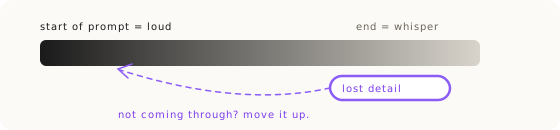
Position matters roughly three times over. Image models pay more attention to earlier tokens, and we quantified it in a word-order eval: identical words, only the position changed. The same size clause scored 2.6% error as the first sentence, 6.2% as the last, and 7.8% buried in the middle. First is 2.5 to 3 times more accurate than last, and middle is the worst place of all, because an instruction tucked inside the scene description gets diluted most.
So the standing rule for every recipe and template is: the critical size constraint is the very first sentence, then the scene. This is the same hierarchy of attention that governs brand color and unusual proportions. If a size keeps coming out wrong, before you rewrite the words, try moving them to the front. In our dimension eval, every prompt had the size clause last, which means those error numbers are probably beatable across the board just by reordering. Cheap fix, measured payoff.
The Whole Kit, In Order
Put it together and size control is five tools used together, not in isolation. One, the magnitude ladder to steer with words. Two, comparison anchoring to one clean singular object. Three, landmark anchoring using the body or the product's own parts as the ruler. Four, shout-and-forbid to name the blocked mistake in capitals. Five, sketch it when words fail. Keep the centimeter figure in the prompt as the human-readable truth, but never lean on it for steering. And check the input before any of it: a soft or cluttered source undercuts every lever here, which is why a clean reference comes before the prompt.
Then decide by the measured rule: weird size gets the magnitude word, normal size gets a number plus one clean anchor with a landmark, unsure gets all three, and the whole clause goes first in the prompt. Size is one of the accuracy levers that decides whether an image is a deliverable or a refund. For the full accuracy system it sits inside, see Product Accuracy with Nano Banana and the route map for choosing the right fix per problem.
Key Takeaways.
- The AI learned from pictures, and pictures carry no measurements: it knows relative magnitude, never centimeters.
- Centimeters don't steer, they coast: a number-only prompt scored worst (0.196 error) and only looks accurate when the default already matches.
- Magnitude words are a hammer, not a dial: escalate 'small' to 'extremely small' for unusual sizes, but leave the word out for normal ones or it overshoots.
- Anchor to one clean singular object with a landmark; drop hands (39% error) and plural anchors (30%).
- The measured rule: weird size gets the magnitude word, normal size gets a number plus one clean anchor, unsure gets all three.
- Put the size clause first: the same words score 2.6% error at the start versus 7.8% in the middle.
Ready to Put This Into Practice?
Dezygn gives you the AI creative tools, training, and community to turn these insights into real results for your clients.
Start FreeRelated Resources.
How to Get Product Accuracy with Nano Banana
Product accuracy in AI product photography is a discipline: name the defect, diagnose it, route it to the right technique, judge the output. Measured, not luck.
Read guideThe Prior Test: When the AI Knows Your Product's Material Better Than You
How do you get AI to render a material correctly? Run the prior test: find out what the model already believes it looks like, then decide if words can fix it.
Read guideThe Product Accuracy Route Map: Diagnosis to Technique
How do you fix an inaccurate AI product image? Name the defect on one of 8 fidelity axes, then route to the exact technique that clears it. The full map.
Read guide