Generate Angles
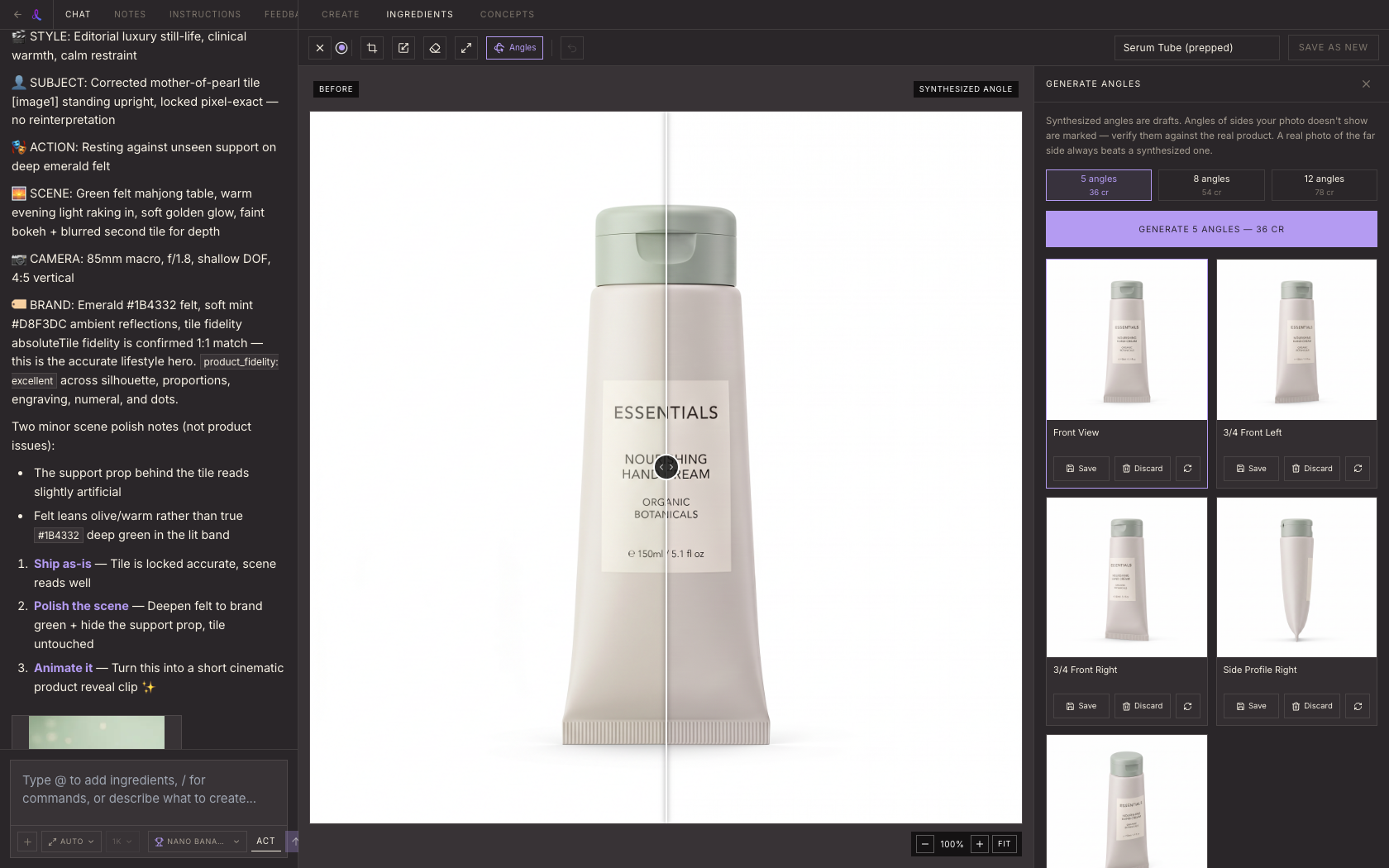
Upload one product photo and get back a consistent studio set from every angle you need, so any composition can start from the right view.
Updated 2026-07-20
Overview
Generate Angles turns one product photo into a consistent multi-angle studio set. It lives in *Workspace > Ingredients > Prep*, next to *Upscale* and *Background Removal*. Pick 5, 8, or 12 angles and in about 90 seconds you get back a tile for each one. Save the ones you want and they land in your Ingredients library as their own assets, ready to build compositions from.
The reason this matters: a composition is most accurate when it starts from a source photo at the matching angle. The product's real pixels get locked in and the scene gets built around them, instead of the AI guessing the product's shape from a different view. A full angle set means whatever angle a future frame needs, you already have a real source for it.
How It Works
- 1Pick a tier. Choose 5, 8, or 12 angles (36, 54, or 78 credits). More angles means more coverage, not better quality, so pick based on how many views you'll actually use.
- 2Tiles fill in. Your photo is first normalized into a clean white packshot at its original camera angle, then every requested angle is generated in one jump from that same clean reference. Tiles appear as each angle finishes.
- 3Save the keepers, regenerate the misses. Each tile has three actions: *Save* adds it to your Ingredients library as a new ingredient (your original photo is untouched), *Discard* drops it, and *Regenerate* (6 credits) redoes just that one angle without touching the rest of the set.
The trust badge
Some angles carry a "Verify against your product" badge, usually the back or the underside. This shows up whenever the requested angle shows a side of the product that your source photo didn't actually capture.
The AI can only be trusted for geometry it can actually see in your photo. For a hidden side, it's making an educated guess based on the visible sides and what that kind of product typically looks like from there. That guess is often close, but a real photo of the far side will always beat a synthesized one. Treat flagged angles as a starting point, and swap in a real photo of that side whenever you have one.
Credits
- 5 angles: 36 credits
- 8 angles: 54 credits
- 12 angles: 78 credits
- Regenerate a single angle: 6 credits
The math is (angles + 1) × 6: one hidden clean packshot reference gets generated first, then one generation per requested angle, all at 6 credits each.
Related articles
Didn't find what you needed?
Tell us what you're stuck on — a real human reads every message and replies within 24 hours on business days.