
Home
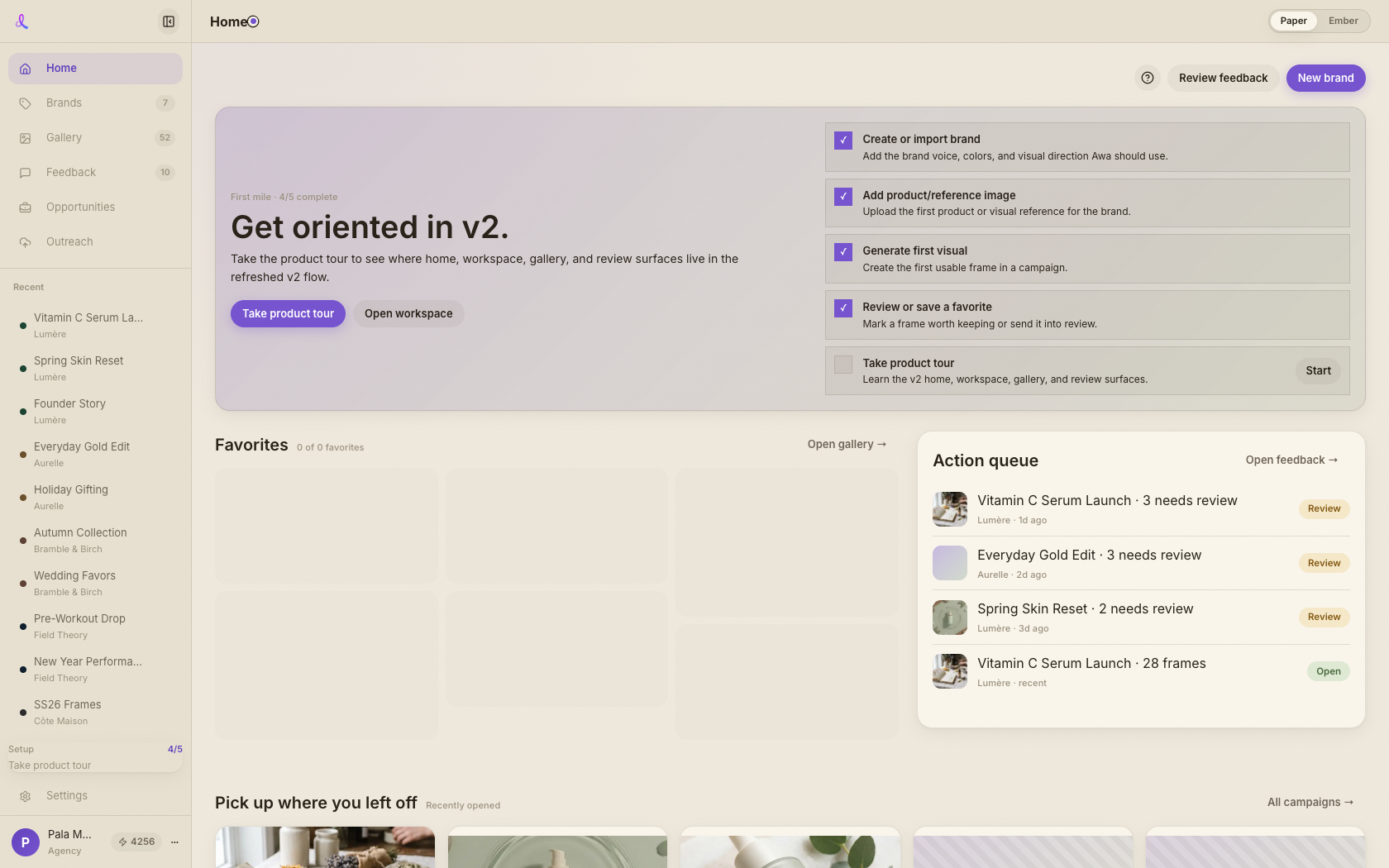
Home is your studio's front door — favorite frames up top, the campaign you were just in one tap away, an action queue for anything waiting on you, and every brand within reach.
Updated 2026-06-13
Overview
Home is the front door to your studio. Instead of a blank start page, it shows what you actually care about the moment you land: the frames you've starred, the campaign you were just in, anything waiting on your review, and all your brands within reach. From here you're one tap from every part of the app.
What you can do here
- Reopen your best frames. The Favorites mosaic up top holds every frame you've starred. Click a tile to jump straight back to the campaign it lives in, or open the full Gallery.
- Clear your action queue. The Action queue gathers review rounds and concept decisions that need you. Each row opens the feedback or campaign behind it.
- Pick up where you left off. Your most recently opened campaigns sit ready below — one tap back into any workspace.
- Jump to a brand. The Brands row shows a thumbnail wall and campaign count per brand, so you can dive into the right one fast.
Related articles
Didn't find what you needed?
Tell us what you're stuck on — a real human reads every message and replies within 24 hours on business days.